---
title: PingOne
description: The PingOne integration allows you to monitor audit activity. PingOne is a cloud-based framework for secure identity access management. Use the PingOne...
url: https://www.elastic.co/docs/reference/integrations/ping_one
products:
- Elastic integrations
applies_to:
- Serverless Observability projects: Generally available
- Serverless Security projects: Generally available
- Elastic Stack: Generally available since 9.1
---
# PingOne
| | |
|-------------------------------------------------------------------------------------------------|---------------------------------|
| **Version** | 1.27.0 ([View all](#changelog)) |
| **Managed integration release status** | GA |
| **Subscription level**[What's this?](https://www.elastic.co/subscriptions) | Basic |
| **Developed by**[What's this?](https://www.elastic.co/docs/reference/integrations/developed-by) | Elastic |
| **Ingestion method(s)** | API, Webhook |
| **Minimum Kibana version(s)** | 9.1.49.0.78.19.4 |
You can use this integration as an Elastic Managed integration on Elastic Cloud Hosted deployments running this version or later.
## Overview
The [PingOne](https://www.pingidentity.com/en.html) integration allows you to monitor audit activity. PingOne is a cloud-based framework for secure identity access management.
Use the PingOne integration to collect and parse data from the REST APIs or HTTP Endpoint input. Then visualize that data in Kibana.
For example, you could use the data from this integration to know which action or activity is performed against a defined PingOne resource, and also track the actor or agent who initiated the action.
## Elastic Managed enabled integration
Elastic Managed integrations are only supported on Elastic Cloud Serverless and Elastic Cloud Hosted deployments. An Elastic Managed integration lets you ingest data from a cloud source while avoiding the orchestration, management, and maintenance associated with standard ingest infrastructure. Elastic runs the collector for you, so you can focus on your data instead of the infrastructure that collects it.
For more information, refer to [Elastic Managed integrations](https://www.elastic.co/docs/manage-data/ingest/managed-integrations/managed-integrations) and the [Elastic Managed integrations FAQ](https://www.elastic.co/docs/manage-data/ingest/managed-integrations/managed-integrations-faq).
## Data streams
The PingOne integration collects logs for one type of event: Audit.
**Audit** reporting stores incoming audit messages in a cache and provides endpoints for requesting audit events for a specific time period.
## Requirements
You need Elasticsearch for storing and searching your data and Kibana for visualizing and managing it. You can use our hosted Elasticsearch Service on Elastic Cloud, which is recommended, or self-manage the Elastic Stack on your own hardware.
This module has been tested against `PingOne API version 1.0`.
## Setup
### To collect data from the PingOne REST API, follow the steps below:
Create a worker application in PingOne and copy the credentials, as follows:
1. Go to [pingidentity.com](https://pingidentity.com/), click
[Sign On](https://www.pingidentity.com/bin/ping/signOnLink) and carry out
any necessary authentication steps. You will arrive at the PingIdentity
console.
2. From the navigation sidebar, expand the **Applications** section and
select **Applications**.
3. Click **+** to begin creating a new application.
4. Enter an **Application Name**.
5. Select **Worker** as the application type.
6. Click **Save**.
7. On the application flyout, ensure that the toggle switch in the header is
activated, in order to enable the application.
8. Select the **Roles** tab of the application flyout.
9. Click the **Grant Roles** button.
10. Under **Available responsibilities**, in the **Environment Admin**,
section, select the environment(s) to grant access to, then click **Save**.
11. Select the **Configuration** tab of the application flyout.
12. Expand the **URLs** section and copy the **Token Endpoint**.
13. From the **General** section, copy the **Client ID**, **Client Secret** and
**Environment ID**.
For more information, see the PingOne documentation about
[Adding an application](https://docs.pingidentity.com/r/en-us/pingone/p1_add_app_worker).
In Elastic, navigate to the PingOne integration, then:
1. Click **Add PingOne**.
2. Deactivate the **Collect PingOne logs via HTTP Endpoint** input.
3. Activate the **Collect PingOne logs via API** input.
4. Enter the PingOne API URL for your region in the **URL** field.
5. Enter the credentails copied from the PingOne console into the corresponding
fields.
6. In the **Audit logs** data stream section, set an **Initial Interval** of
no more than 2 years.
7. Choose an agent policy to add the integration to and click
**Save and Continue**.
### To collect data from PingOne via HTTP Endpoint, follow below steps:
In Elastic, navigate to the PingOne integration, then:
1. Click **Add PingOne**.
2. Deactivate the **Collect PingOne logs via API** input.
3. Activate the **Collect PingOne logs via HTTP Endpoint** input.
4. Set the **Listen Address**, and (from the **Audit logs** data stream
settings) set and copy the **Listen Port** and (under **Advanced options**)
the **URL Path**.
5. In the input settings, enter any **SSL Configuration** and **Secret header**
settings appropriate for the endpoint. Make a note of these details for use
while configuring the PingOne webhook. **Note**: This endpoint will expose a
port to the Internet, so it is advised to have proper network access
configured. PingOne webhooks will only work with a `https://` destination
URL.
6. Choose an agent policy to add the integration to and click
**Save and Continue**.
Create a webhook in PingOne, as follows:
1. Go to [pingidentity.com](https://pingidentity.com/), click
[Sign On](https://www.pingidentity.com/bin/ping/signOnLink) and carry out
any necessary authentication steps. You will arrive at the PingIdentity
console.
2. From the navigation sidebar, expand the **Integrations** section and
select **Webhooks**.
3. Click the **+ Add Webhook** button to begin creating a new webhook.
4. In **Destination URL**, enter the full endpoint URL, including the port.
Example format: `https://{EXTERNAL_AGENT_LISTEN_ADDRESS}:{AGENT_LISTEN_PORT}/{URL_PATH}`.
5. As **Format** select **Ping Activity Format (JSON)**.
6. In the **Filters** section, select all the **Event Types** you want to
collect.
7. Enter any **TLS settings** and **Headers** required for the webhook to
establish connections with the Agent's HTTP endpoint.
8. Click **Save**.
9. Ensure that the toggle switch for the webhook is activated, so that the
webhook is enabled.
For more information, see the PingOne documentation about
[Creating or editing a webhook](https://docs.pingidentity.com/r/en-us/pingone/p1_create_webhook).
## Logs Reference
#### audit
This is the `audit` dataset.
```json
{
"@timestamp": "2022-08-08T15:31:08.237Z",
"agent": {
"ephemeral_id": "d67bd0bc-bf75-4446-aea0-a2f78a4ae945",
"id": "c1e440f4-a271-44e0-842c-ef5e47e4fcc3",
"name": "elastic-agent-78287",
"type": "filebeat",
"version": "8.19.4"
},
"client": {
"user": {
"id": "123abc123-12ab-1234-1abc-abc123abc12",
"name": "PingOne Admin Console"
}
},
"data_stream": {
"dataset": "ping_one.audit",
"namespace": "51949",
"type": "logs"
},
"ecs": {
"version": "8.11.0"
},
"elastic_agent": {
"id": "c1e440f4-a271-44e0-842c-ef5e47e4fcc3",
"snapshot": false,
"version": "8.19.4"
},
"event": {
"action": "user.access_allowed",
"agent_id_status": "verified",
"category": [
"iam",
"configuration"
],
"dataset": "ping_one.audit",
"id": "123abc123-12ab-1234-1abc-abc123abc12",
"ingested": "2025-12-22T10:12:35Z",
"kind": "event",
"original": "{\"_embedded\":{},\"action\":{\"type\":\"USER.ACCESS_ALLOWED\"},\"actors\":{\"client\":{\"environment\":{\"id\":\"123abc123-12ab-1234-1abc-abc123abc12\"},\"href\":\"https://api.pingone.asia/v1/environments/123abc123-12ab-1234-1abc-abc123abc12/applications/123abc123-12ab-1234-1abc-abc123abc12\",\"id\":\"123abc123-12ab-1234-1abc-abc123abc12\",\"name\":\"PingOne Admin Console\",\"type\":\"CLIENT\"},\"user\":{\"environment\":{\"id\":\"123abc123-12ab-1234-1abc-abc123abc12\"},\"href\":\"https://api.pingone.asia/v1/environments/123abc123-12ab-1234-1abc-abc123abc12/users/123abc123-12ab-1234-1abc-abc123abc12\",\"id\":\"123abc123-12ab-1234-1abc-abc123abc12\",\"name\":\"example@gmail.com\",\"population\":{\"id\":\"123abc123-12ab-1234-1abc-abc123abc12\"},\"type\":\"USER\"}},\"id\":\"123abc123-12ab-1234-1abc-abc123abc12\",\"recordedAt\":\"2022-08-08T15:31:08.237Z\",\"resources\":[{\"environment\":{\"id\":\"123abc123-12ab-1234-1abc-abc123abc12\"},\"href\":\"https://api.pingone.asia/v1/environments/123abc123-12ab-1234-1abc-abc123abc12/users/123abc123-12ab-1234-1abc-abc123abc12\",\"id\":\"123abc123-12ab-1234-1abc-abc123abc12\",\"name\":\"example@gmail.com\",\"population\":{\"id\":\"123abc123-12ab-1234-1abc-abc123abc12\"},\"type\":\"USER\"}],\"result\":{\"description\":\"Passed role access control\",\"status\":\"SUCCESS\"}}",
"outcome": "success",
"type": [
"user",
"info",
"access"
]
},
"input": {
"type": "http_endpoint"
},
"ping_one": {
"audit": {
"action": {
"type": "USER.ACCESS_ALLOWED"
},
"actors": {
"client": {
"environment": {
"id": "123abc123-12ab-1234-1abc-abc123abc12"
},
"href": "https://api.pingone.asia/v1/environments/123abc123-12ab-1234-1abc-abc123abc12/applications/123abc123-12ab-1234-1abc-abc123abc12",
"id": "123abc123-12ab-1234-1abc-abc123abc12",
"name": "PingOne Admin Console",
"type": "CLIENT"
},
"user": {
"environment": {
"id": "123abc123-12ab-1234-1abc-abc123abc12"
},
"href": "https://api.pingone.asia/v1/environments/123abc123-12ab-1234-1abc-abc123abc12/users/123abc123-12ab-1234-1abc-abc123abc12",
"id": "123abc123-12ab-1234-1abc-abc123abc12",
"name": "example@gmail.com",
"population": {
"id": "123abc123-12ab-1234-1abc-abc123abc12"
},
"type": "USER"
}
},
"id": "123abc123-12ab-1234-1abc-abc123abc12",
"recorded_at": "2022-08-08T15:31:08.237Z",
"resources": [
{
"environment": {
"id": "123abc123-12ab-1234-1abc-abc123abc12"
},
"href": "https://api.pingone.asia/v1/environments/123abc123-12ab-1234-1abc-abc123abc12/users/123abc123-12ab-1234-1abc-abc123abc12",
"id": "123abc123-12ab-1234-1abc-abc123abc12",
"name": "example@gmail.com",
"population": {
"id": "123abc123-12ab-1234-1abc-abc123abc12"
},
"type": "USER"
}
],
"result": {
"description": "Passed role access control",
"status": "SUCCESS"
}
}
},
"related": {
"user": [
"123abc123-12ab-1234-1abc-abc123abc12",
"PingOne Admin Console",
"example",
"example@gmail.com"
]
},
"tags": [
"preserve_original_event",
"preserve_duplicate_custom_fields",
"forwarded",
"ping_one-audit"
],
"url": {
"domain": "api.pingone.asia",
"original": "https://api.pingone.asia/v1/environments/123abc123-12ab-1234-1abc-abc123abc12/users/123abc123-12ab-1234-1abc-abc123abc12",
"path": "/v1/environments/123abc123-12ab-1234-1abc-abc123abc12/users/123abc123-12ab-1234-1abc-abc123abc12",
"scheme": "https"
},
"user": {
"domain": "gmail.com",
"email": "example@gmail.com",
"id": "123abc123-12ab-1234-1abc-abc123abc12",
"name": "example"
}
}
```
| Field | Description | Type |
|----------------------------------------------------|----------------------------------------------------------------------------------------------------------------------------------------|------------------|
| @timestamp | Event timestamp. | date |
| cloud.image.id | Image ID for the cloud instance. | keyword |
| data_stream.dataset | Data stream dataset. | constant_keyword |
| data_stream.namespace | Data stream namespace. | constant_keyword |
| data_stream.type | Data stream type. | constant_keyword |
| event.dataset | Event dataset. | constant_keyword |
| event.module | Event module. | constant_keyword |
| host.containerized | If the host is a container. | boolean |
| host.os.build | OS build information. | keyword |
| host.os.codename | OS codename, if any. | keyword |
| input.type | Input type | keyword |
| log.offset | Log offset | long |
| ping_one.audit.action.description | A string that specifies the description of the action performed. | text |
| ping_one.audit.action.type | A string that specifies the type of action performed (such as authentication or password reset). | keyword |
| ping_one.audit.actors.client.environment.id | A string that specifies the ID of the environment resource associated with the client. | keyword |
| ping_one.audit.actors.client.href | A string that specifies the URL for the specified client resource. | keyword |
| ping_one.audit.actors.client.id | A string that specifies the ID of the client. | keyword |
| ping_one.audit.actors.client.name | A string that specifies the name assigned to the client for PingOne sign on. | keyword |
| ping_one.audit.actors.client.type | A string that specifies the type of actor. Options are USER or CLIENT. | keyword |
| ping_one.audit.actors.user.environment.id | A string that specifies the ID of the environment resource associated with the user. | keyword |
| ping_one.audit.actors.user.href | A string that specifies the URL for the specified user resource. | keyword |
| ping_one.audit.actors.user.id | A string that specifies the ID of the user. | keyword |
| ping_one.audit.actors.user.name | A string that specifies the name assigned to the user for PingOne sign on. | keyword |
| ping_one.audit.actors.user.population.id | A string that specifies the ID of the population resource associated with the user. | keyword |
| ping_one.audit.actors.user.type | A string that specifies the type of actor. Options are USER or CLIENT. | keyword |
| ping_one.audit.correlation.id | A string that specifies a PingOne identifier for multiple messages in a transaction. | keyword |
| ping_one.audit.created_at | The date and time at which the event was created (ISO 8601 format). | date |
| ping_one.audit.embedded | | flattened |
| ping_one.audit.id | A string that specifies the ID of the audit activity event. | keyword |
| ping_one.audit.internal_correlation.transaction_id | | keyword |
| ping_one.audit.recorded_at | The date and time at which the event was recorded (ISO 8601 format). | date |
| ping_one.audit.resources.environment.id | The UUID assigned as the key for the environment resource. | keyword |
| ping_one.audit.resources.href | A string that specifies the URL for the specified resource. | keyword |
| ping_one.audit.resources.id | A string that specifies the ID assigned as the key for the identifier resource (such as the environment, population or event message). | keyword |
| ping_one.audit.resources.name | A string that can be either the user name or the name of the environment, based on the resource type. | keyword |
| ping_one.audit.resources.population.id | The UUID assigned as the key for the population resource. | keyword |
| ping_one.audit.resources.type | A string that specifies the type of resource associated with the event. Options are USER, ORGANIZATION, or ENVIRONMENT. | keyword |
| ping_one.audit.result.description | A string that specifies the description of the result of the operation. | text |
| ping_one.audit.result.id | A string that specifies the ID for the result of the operation. | keyword |
| ping_one.audit.result.status | A string that specifies the result of the operation. Options are succeeded or failed. | keyword |
| ping_one.audit.source.ip_address | | ip |
| ping_one.audit.source.user_agent | | keyword |
| ping_one.audit.tags | A string identifying the activity as the action of an administrator on other administrators. | keyword |
## Screenshots
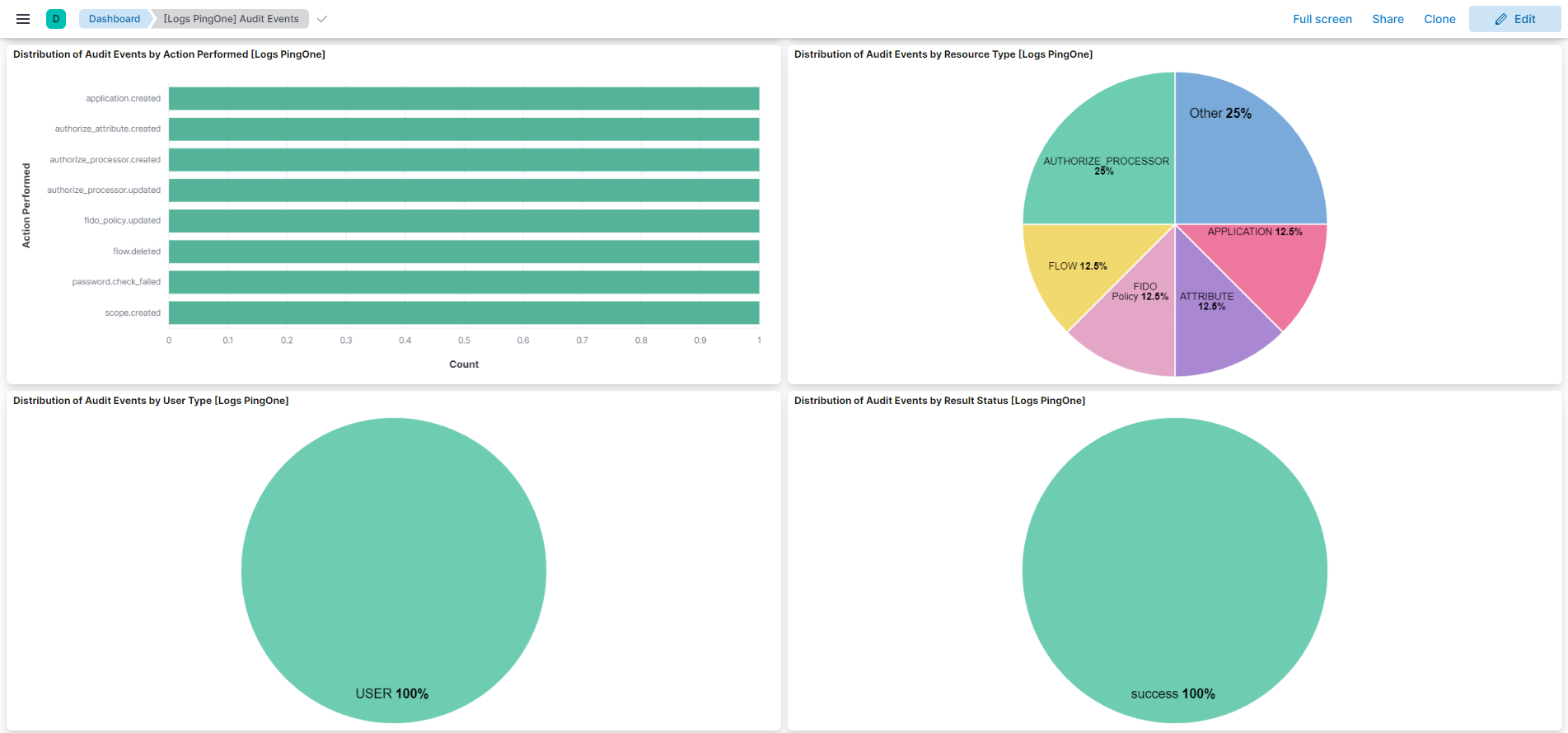
This integration includes one or more Kibana dashboards that visualizes the data collected by the integration. The screenshots below illustrate how the ingested data is displayed.
## Changelog
| Version | Details | Minimum Kibana version |
|------------|----------------------------------------------------------------------------------------------------------------------------------------------------------------------------------------------------------------------------------------------|------------------------|
| **1.27.0** | **Enhancement** ([View pull request](https://github.com/elastic/integrations/pull/20987))Update Elastic Managed integration documentation to the current wording and docs links. | 9.1.49.0.78.19.4 |
| **1.26.0** | **Enhancement** ([View pull request](https://github.com/elastic/integrations/pull/20927))Enable request trace log removal. | 9.1.49.0.78.19.4 |
| **1.25.0** | **Enhancement** ([View pull request](https://github.com/elastic/integrations/pull/20573))Add tags to ingest pipeline processors. | 9.1.49.0.78.19.4 |
| **1.24.1** | **Enhancement** ([View pull request](https://github.com/elastic/integrations/pull/20421))Set agentless deployment mode `release` field to `ga`. | 9.1.49.0.78.19.4 |
| **1.24.0** | **Enhancement** ([View pull request](https://github.com/elastic/integrations/pull/18552))Use new `release` field for agentless deployment mode to establish as beta. | 9.1.49.0.78.19.4 |
| **1.23.0** | **Enhancement** ([View pull request](https://github.com/elastic/integrations/pull/18122))Enable Agentless deployment. | 9.1.49.0.78.19.4 |
| **1.22.0** | **Enhancement** ([View pull request](https://github.com/elastic/integrations/pull/16663))Prevent updating fleet health status to degraded when pagination completes. | 9.1.49.0.78.19.4 |
| **1.21.0** | **Enhancement** ([View pull request](https://github.com/elastic/integrations/pull/15789))Parse and map the `internalCorrelation.*` and `source.*` fields. | 9.0.08.13.0 |
| **1.20.0** | **Enhancement** ([View pull request](https://github.com/elastic/integrations/pull/14137))Standardize user fields processing across integrations. | 9.0.08.13.0 |
| **1.19.0** | **Enhancement** ([View pull request](https://github.com/elastic/integrations/pull/12919))Update Kibana constraint to support 9.0.0. | 9.0.08.13.0 |
| **1.18.1** | **Bug fix** ([View pull request](https://github.com/elastic/integrations/pull/12781))Updated SSL description in package manifest.yml to be uniform and to include links to documentation. | 8.13.0 |
| **1.18.0** | **Enhancement** ([View pull request](https://github.com/elastic/integrations/pull/12076))Do not remove `event.original` in main ingest pipeline. | 8.13.0 |
| **1.17.0** | **Enhancement** ([View pull request](https://github.com/elastic/integrations/pull/12046))Add "preserve_original_event" tag to documents with `event.kind` set to "pipeline_error". | 8.13.0 |
| **1.16.0** | **Enhancement** ([View pull request](https://github.com/elastic/integrations/pull/10135))Update the kibana constraint to ^8.13.0. Modified the field definitions to remove ECS fields made redundant by the ecs@mappings component template. | 8.13.0 |
| **1.15.0** | **Enhancement** ([View pull request](https://github.com/elastic/integrations/pull/9974))Improve handling of empty responses. | 8.12.0 |
| **1.14.1** | **Bug fix** ([View pull request](https://github.com/elastic/integrations/pull/9750))Update setup documentation. | 8.12.0 |
| **1.14.0** | **Enhancement** ([View pull request](https://github.com/elastic/integrations/pull/9128))Set sensitive values as secret. | 8.12.0 |
| **1.13.2** | **Bug fix** ([View pull request](https://github.com/elastic/integrations/pull/9076))Fix ingest pipeline conditional field handling. | 8.7.1 |
| **1.13.1** | **Enhancement** ([View pull request](https://github.com/elastic/integrations/pull/8943))Changed owners | 8.7.1 |
| **1.13.0** | **Enhancement** ([View pull request](https://github.com/elastic/integrations/pull/8489))Limit request tracer log count to five. | 8.7.1 |
| **1.12.0** | **Enhancement** ([View pull request](https://github.com/elastic/integrations/pull/8434))ECS version updated to 8.11.0. | 8.7.1 |
| **1.11.0** | **Enhancement** ([View pull request](https://github.com/elastic/integrations/pull/8269))Improve 'event.original' check to avoid errors if set. | 8.7.1 |
| **1.10.0** | **Enhancement** ([View pull request](https://github.com/elastic/integrations/pull/8025))Update the package format_version to 3.0.0. | 8.7.1 |
| **1.9.0** | **Enhancement** ([View pull request](https://github.com/elastic/integrations/pull/7944))Update package to ECS 8.10.0 and align ECS categorization fields. | 8.7.1 |
| **1.8.0** | **Enhancement** ([View pull request](https://github.com/elastic/integrations/pull/7789))Add tags.yml file so that integration's dashboards and saved searches are tagged with "Security Solution" and displayed in the Security Solution UI. | 8.7.1 |
| **1.7.0** | **Enhancement** ([View pull request](https://github.com/elastic/integrations/pull/7296))Update package-spec to 2.9.0. | 8.7.1 |
| **1.6.0** | **Enhancement** ([View pull request](https://github.com/elastic/integrations/pull/7110))Update package to ECS 8.9.0. | 8.7.1 |
| **1.5.0** | **Enhancement** ([View pull request](https://github.com/elastic/integrations/pull/6992))Document duration units. | 8.7.1 |
| **1.4.0** | **Enhancement** ([View pull request](https://github.com/elastic/integrations/pull/6662))Ensure event.kind is correctly set for pipeline errors. | 8.7.1 |
| **1.3.0** | **Enhancement** ([View pull request](https://github.com/elastic/integrations/pull/6327))Update package to ECS 8.8.0. | 8.7.1 |
| **1.2.0** | **Enhancement** ([View pull request](https://github.com/elastic/integrations/pull/6115))Add a new flag to enable request tracing | 8.7.1 |
| **1.1.0** | **Enhancement** ([View pull request](https://github.com/elastic/integrations/pull/5765))Update package to ECS 8.7.0. | 8.0.07.17.0 |
| **1.0.0** | **Enhancement** ([View pull request](https://github.com/elastic/integrations/pull/5677))Release PingOne as GA. | 8.0.07.17.0 |
| **0.3.1** | **Enhancement** ([View pull request](https://github.com/elastic/integrations/pull/5123))Added categories and/or subcategories. | 8.0.07.17.0 |
| **0.3.0** | **Enhancement** ([View pull request](https://github.com/elastic/integrations/pull/4576))Update package to ECS 8.6.0. | 8.0.07.17.0 |
| **0.2.0** | **Enhancement** ([View pull request](https://github.com/elastic/integrations/pull/4285))Update package to ECS 8.5.0. | 8.0.07.17.0 |
| **0.1.0** | **Enhancement** ([View pull request](https://github.com/elastic/integrations/pull/4014))Initial Release. | 8.0.07.17.0 |