Troubleshoot detection rules
This topic covers common troubleshooting issues when creating or managing detection rules.
Depending on your privileges and whether detection system indices have already been created for the Kibana space, you might get one of these error messages when you open the Alerts or Detection rules (SIEM) page:
Let's set up your detection engine
If you get this message, a user with specific privileges must visit the Alerts or Detection rules (SIEM) page before you can view detection alerts and rules. Refer to Detections prerequisites and requirements for a list of all the requirements.
For self-managed Elastic Stack deployments only, this message might display when the xpack.encryptedSavedObjects.encryptionKey setting has not been added to the kibana.yml file. For more information, refer to Turn on detections.
Detection engine permissions required
If you get this message, you do not have the required privileges to view the Detections feature, and you should contact your Kibana administrator.
For self-managed Elastic Stack deployments only, this message might display when the xpack.security.enabled setting is not enabled in the elasticsearch.yml file. For more information, refer to Turn on detections.
Warning about required read privileges for indices you can access
You might receive the following warning for a rule even when your role clearly includes privileges for the index patterns:
This rule may not have the required read privileges to the following index patterns: [...]
This can happen when your role's index privileges are defined as a single, comma-separated pattern. When you enter multiple index patterns as one combined entry (for example, auditbeat-*,filebeat-*), the privileges aren't granted to each pattern individually, so the rule's privilege check fails.
To fix this, itemize the index privileges so each pattern is its own entry:
- Go to the Custom Roles management page using the navigation menu or the global search field, then edit the affected role.
- Split any combined, comma-separated index patterns into separate entries, then save the role.
- Edit and save the affected rule so it picks up the updated privileges. Turning a rule off and on does not refresh its privileges.
Machine learning rule is failing and a required machine learning job is stopped
If a machine learning rule is failing, check to make sure the required machine learning jobs are running and start any jobs that have stopped.
Go to Rules → Detection rules (SIEM), then select the machine learning rule. The required machine learning jobs and their statuses are listed in the Definition section.
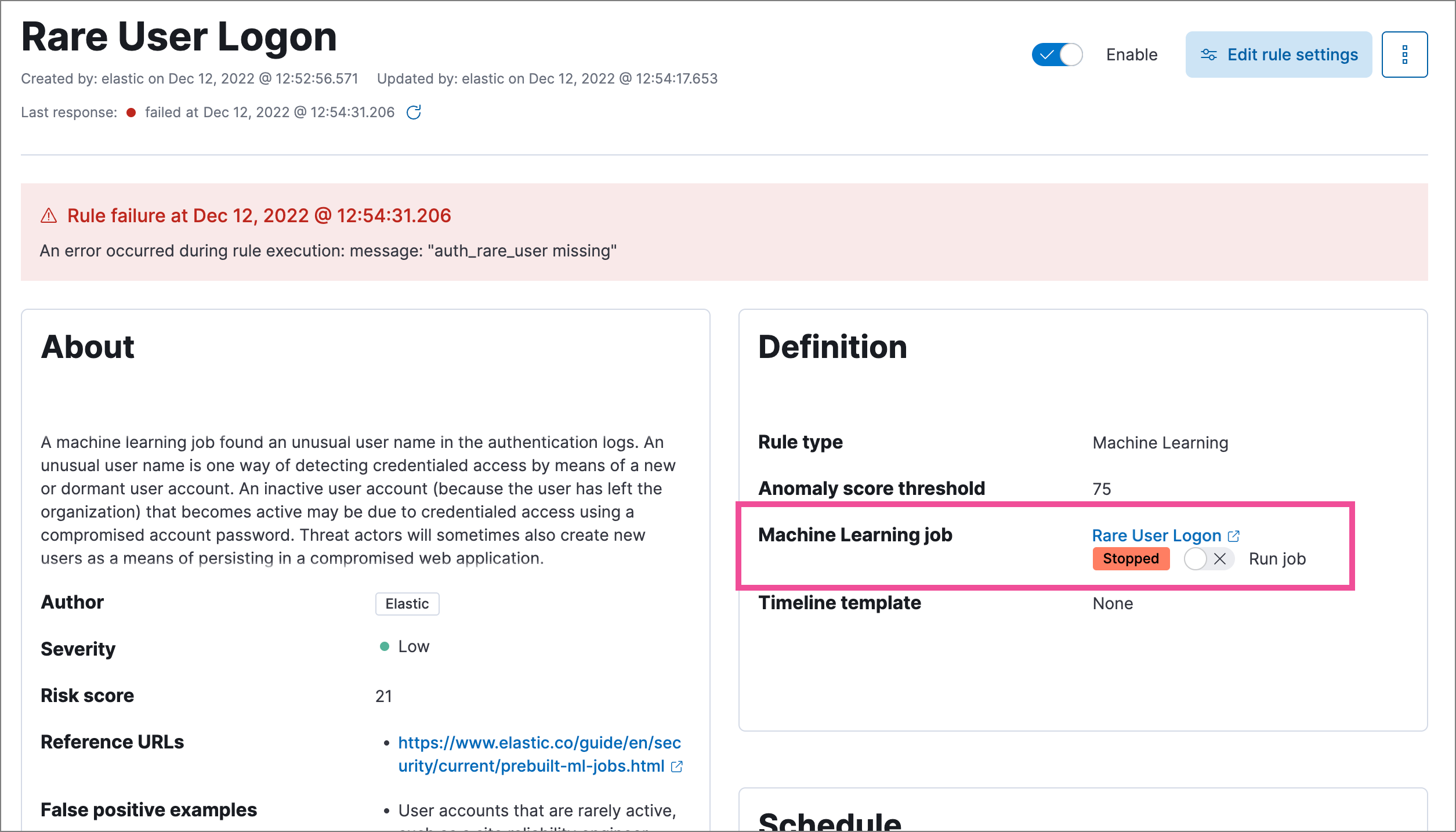
If a required machine learning job isn’t running, turn on the Run job toggle next to it.
Rerun the machine learning detection rule.
Rules are failing due to number of alerts
If you receive the following rule failure: "Bulk Indexing of signals failed: [parent] Data too large", this indicates that the alerts payload was too large to process.
This can be caused by bad indicator data, a misconfigured rule, or too many event matches. Review your indicator data or rule query. If nothing obvious is misconfigured, try executing the rule against a subset of the original data and continue diagnosis.
Indicator match rules are timing out
If you receive the following rule failure: "An error occurred during rule execution: message: "Request Timeout after 90000ms", this indicates that the query phase is timing out. Try refining the time frame or dividing the data defined in the query into multiple rules.
Indicator match rules are failing because the maxClauseCount limit is too low
If you receive the following rule failure: Bulk Indexing of signals failed: index: ".index-name" reason: "maxClauseCount is set to 1024" type: "too_many_clauses", this indicates that the limit for the total number of clauses that a query tree can have is too low. To update your maximum clause count, increase the size of your Elasticsearch JVM heap memory. 1 GB of Elasticsearch JVM heap size or more is sufficient.
General slowness
If you notice rule delays, review the suggestions above to troubleshoot, and also consider limiting the number of rules that run simultaneously, as this can cause noticeable performance implications in Kibana.
No autocomplete suggestions
When you’re creating detection rule exceptions, autocomplete might not provide suggestions in the Value field if the values don’t exist in the current page’s time range.
You can resolve this by expanding the time range, or by configuring Kibana's autocomplete feature to get suggestions from your full data set instead. Go to Kibana → Stack Management → Advanced Settings, then turn off autocomplete:useTimeRange.
Turning off autocomplete:useTimeRange could cause performance issues if the data set is especially large.
Warning about type conflicts and unmapped fields
A warning icon ( ) and message appear for fields with type conflicts across multiple indices or fields that are unmapped. You can learn more about the conflict by clicking the warning message.
A field can have type conflicts and be unmapped in specified indices.
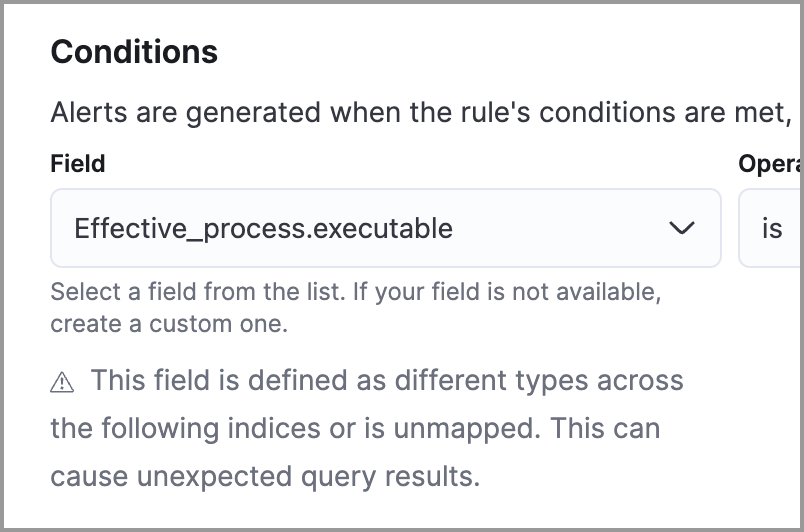
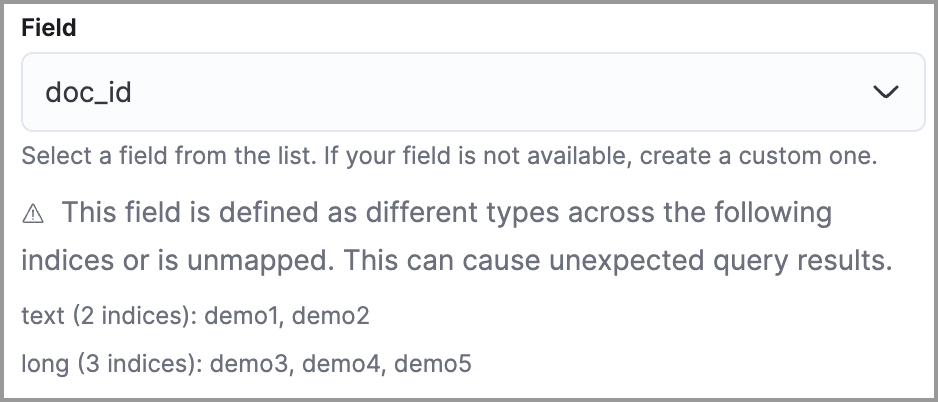
Type conflicts occur when a field is mapped to different types across multiple indices. To resolve this issue, you can create new indices with matching field type mappings and reindex your data. Otherwise, use the information about a field’s type mappings to ensure you’re entering compatible field values when defining exception conditions.
In the following example, the selected field has been defined as different types across five indices.
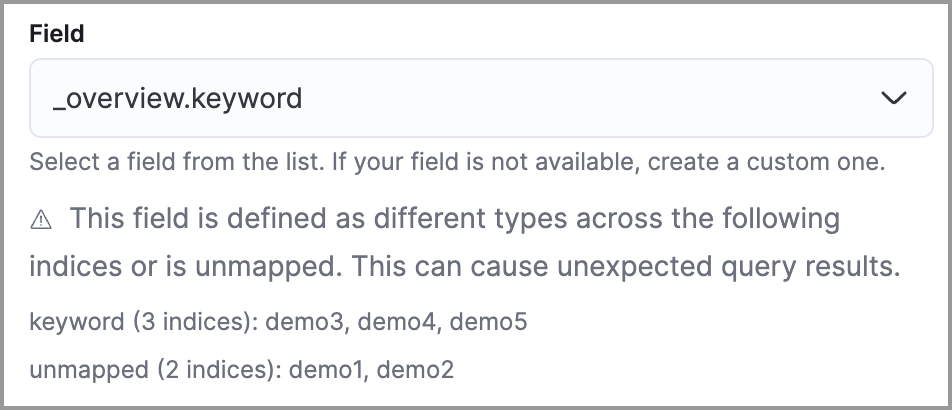
Unmapped fields are undefined within an index’s mapping definition. Using unmapped fields to define an exception can prevent it from working as expected, and lead to false positives or unexpected alerts. To fix unmapped fields, add them to your indices' mapping definitions.
In the following example, the selected field is unmapped across two indices.
Non-aggregating ES|QL rule: validation warning about _id or duplicate alerts
For non-aggregating ES|QL detection rules, the engine uses document _id to avoid generating duplicate alerts for the same source event.
METADATA _id to the FROM command when your query omits it, and makes a best-effort attempt to keep _id available in the pipeline (for example by appending _id to restrictive KEEP commands). Refer to ES|QL rules > Alert deduplication and _id metadata to learn more.
If many detection rules time out or fail at around the same time, your project might be running out of search capacity. Other signs include Request timed out errors in Kibana, circuit breaker exceptions, and slower queries in Discover. To check rule outcomes, use the Rule Monitoring tab.
To fix the problem:
- Reduce the search load from your rules. For what to change, refer to Keep rules running on time.
- If rules still time out, contact Elastic Support to request more search capacity. To learn how Elastic Cloud sizes your project's search capacity, refer to How search capacity works.
When a rule fails to run close to its scheduled time, some alerts might be missing. There are a number of ways to try to resolve this issue.
Troubleshoot maximum alerts warning
When a rule reaches the maximum number of alerts it can generate during a single rule execution, the following warning appears on the rule’s details page and in the rule execution log: This rule reached the maximum alert limit for the rule execution. Some alerts were not created.
If you receive this warning, go to the rule’s Alerts tab and check for anything unexpected. Unexpected alerts might be created from data source issues or queries that are too broadly scoped. To further reduce alert volume, you can also add rule exceptions or suppress alerts.
Troubleshoot gaps
If you see values in the Gaps column in the Rule Monitoring table or on the Rule details page for a small number of rules, you can edit those rules and increase their additional look-back time.
It’s recommended to set the Additional look-back time to at least 1 minute. This ensures there are no missing alerts when a rule doesn’t run exactly at its scheduled time.
Elastic Security prevents duplication. Any duplicate alerts that are discovered during the Additional look-back time are not created.
If the rule that experiences gaps is an indicator match rule, see how to tune indicator match rules. Also note that Elastic Security provides limited support for indicator match rules.
If you see gaps for numerous rules:
- If you restarted Kibana when many rules were activated, try deactivating them and then reactivating them in small batches at staggered intervals. This ensures Kibana does not attempt to run all the rules at the same time.
- Consider adding another Kibana instance to your environment.
-
If rules time out or fail alongside the gaps, your project might be running out of search capacity. Refer to Troubleshoot rule timeouts caused by search load.
Troubleshoot ingestion pipeline delay
Even if your rule runs at its scheduled time, there might still be missing alerts if your ingestion pipeline delay is greater than your rule interval + additional look-back time. Prebuilt rules have a minimum interval + additional look-back time of 6 minutes in Elastic Stack version >=7.11.0. To avoid missed alerts for prebuilt rules, use caution to ensure that ingestion pipeline delays remain below 6 minutes.
In addition, use caution when creating custom rule schedules to ensure that the specified interval + additional look-back time is greater than your deployment’s ingestion pipeline delay.
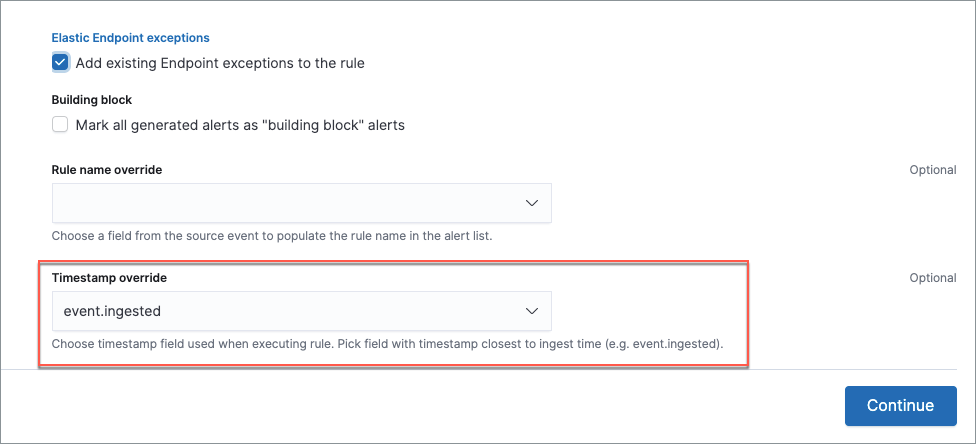
You can reduce the number of missed alerts due to ingestion pipeline delay by specifying the Timestamp override field value to event.ingested in advanced settings during rule creation or editing. The detection engine uses the value from the event.ingested field as the timestamp when executing the rule.
For example, say an event occurred at 10:00 but wasn’t ingested into Elasticsearch until 10:10 due to an ingestion pipeline delay. If you created a rule to detect that event with an interval + additional look-back time of 6 minutes, and the rule executes at 10:12, it would still detect the event because the event.ingested timestamp was from 10:10, only 2 minutes before the rule executed and well within the rule’s 6-minute interval + additional look-back time.
If detection rules are not creating expected alerts or appear to be missing data, the securitySolution:includedDataStreamNamespacesForRuleExecution advanced setting might be limiting which documents are searched. When configured, only events with a matching data_stream.namespace value are queried by all rules in the Kibana space.
To verify:
- Go to Stack Management → Advanced Settings (or Project Settings → Stack Management → Advanced Settings in Serverless).
- Scroll to Security Solution and find Include data stream namespaces in rule execution.
- If the setting lists one or more namespaces, ensure your data is written to those namespaces (for example, check your Fleet integration or data shipper configuration for the
data_stream.namespacevalue). If your data uses different namespace values, add them to the setting or clear the setting to search all namespaces.
Machine learning detection rules use machine learning jobs that have dependencies on data fields populated by the Beats and Elastic Agent integrations. In Elastic Stack 9.0 and later, prebuilt machine learning rules use v3 machine learning jobs, which expect ECS fields that Beats and Elastic Agent have included since version 8.3 (earlier prebuilt rules used v1 or v2 jobs).
If you’re using 8.2 or earlier versions of Beats or Elastic Agent with Elastic Stack 9.0 or later, you might need to duplicate prebuilt rules or create new custom rules before you update the Elastic prebuilt rules. Once you update the prebuilt rules, they will only use v3 machine learning jobs. Duplicating the relevant prebuilt rules before updating them ensures continued coverage by allowing you to keep using v1 or v2 jobs (in the duplicated rules) while also running the v3 jobs (in the updated prebuilt rules). Keep in mind that duplicated rules might result in duplicate anomaly detections and alerts, and ensure that the relevant v3 machine learning jobs are running before you update the Elastic prebuilt rules.
- If you only have 8.3 or later versions of Beats and Elastic Agent: You can download or update your prebuilt rules and use the
v3machine learning jobs. No additional action is required. - If you only have 8.2 or earlier versions of Beats or Elastic Agent, or a mix of old and new versions: To continue using the
v1andv2machine learning jobs from older prebuilt detection rules, you must duplicate affected prebuilt rules before updating them to the latest rule versions. The duplicated rules can continue using the samev1andv2machine learning jobs, and the updated prebuilt machine learning rules will use thev3machine learning jobs. - If you have a non-Elastic data shipper that gathers ECS-compatible events: You can use the
v3machine learning jobs with no additional action required, as long as your data shipper uses the latest ECS specifications. However, if you’re migrating from machine learning rules usingv1/v2jobs, ensure that you start the relevantv3jobs before updating the Elastic prebuilt rules.
The following Elastic prebuilt rules use v3 machine learning jobs to generate alerts. Duplicate their associated v1/v2 prebuilt rules before updating them if you need continued coverage from the v1/v2 machine learning jobs:
- Unusual Linux Network Port Activity:
v3_linux_anomalous_network_port_activity - Unusual Linux Network Connection Discovery:
v3_linux_anomalous_network_connection_discovery - Anomalous Process For a Linux Population:
v3_linux_anomalous_process_all_hosts - Unusual Linux Username:
v3_linux_anomalous_user_name - Unusual Linux Process Calling the Metadata Service:
v3_linux_rare_metadata_process - Unusual Linux User Calling the Metadata Service:
v3_linux_rare_metadata_user - Unusual Process For a Linux Host:
v3_rare_process_by_host_linux - Unusual Process For a Windows Host:
v3_rare_process_by_host_windows - Unusual Windows Network Activity:
v3_windows_anomalous_network_activity - Unusual Windows Path Activity:
v3_windows_anomalous_path_activity - Anomalous Windows Process Creation:
v3_windows_anomalous_process_creation - Anomalous Process For a Windows Population:
v3_windows_anomalous_process_all_hosts - Unusual Windows Username:
v3_windows_anomalous_user_name - Unusual Windows Process Calling the Metadata Service:
v3_windows_rare_metadata_process - Unusual Windows User Calling the Metadata Service:
v3_windows_rare_metadata_user
You can also use Task Manager in Kibana to troubleshoot background tasks and processes that might be related to missing alerts: